Their 10th coffee, on their phone.
A loyalty card in your customers' Apple or Google Wallet, so their 10th coffee is always on their phone. One code on your counter and tables shows your menu, Wi-Fi and today's special, and every scan offers your rewards. Win-back messages bring quiet regulars back. No contract, and 30 days free to try it.
Questions? Call or text (855) 723-0096 or message us on  WhatsApp 24/7, in English or Spanish.
loyalty card
Saves to Apple Wallet and Google Wallet in one tap.
One code on the counter does the work of three signs.
Loyalty cards on their phone
Customers scan once and the card lives in their Wallet. It updates by itself and reminds them how close they are to a free drink.
Today's special
Type one line, like "Pumpkin muffins are back". It shows when customers scan, and can go on members' Wallet cards too.
Menu from a photo
Snap your menu board; we type it in for you to check. Add your Order online link and orders still go to your own system.
Wi-Fi without the questions
A Wi-Fi button shows your network and password, with your rewards right beside it.
Fill the slow hours
Double-stamp afternoons, a welcome bonus and refer-a-friend rewards, applied automatically at the counter.
Bring regulars back
Customers who haven't been in for a while get a win-back nudge with a bonus. Birthday gifts too.
Paper punch cards get lost. Loyalty apps never get downloaded.
Lost, forgotten, and silent
Customers lose them, staff forget to punch them, and you learn nothing about who your regulars are or when they stop coming.
Expensive and hard to leave
Annual contracts, prices that climb into the hundreds per month, and surprise fees. Some only work with one brand of register, and many make customers download yet another app.
Customers drift away quietly
Most one-time visitors never get a reason to come back. Without a way to reach them, you can't tell who's gone or invite them in again.
Everything a regular-making program needs, already set up for you.
Digital loyalty cards
Customers scan your QR code and get a loyalty card on their phone in seconds. No app to download, nothing to lose. Give a stamp per visit, or points for every dollar spent.
Check-in your way, any register
Customers scan a code on your counter screen, type their number, or show their phone card to staff. It runs on a tablet or phone next to whatever register you have, and Square can stamp automatically.
Customers who bring friends
Every card has a personal invite link. When a friend joins and visits, you both thank them with bonus stamps. Win-back and birthday messages go out automatically by email and Wallet card.
More reviews, faster replies
A one-tap review request after a visit (at most once every four months per customer), within Google's and the FTC's rules. When a new Google review comes in, we email you, with a suggested reply whenever Google shares the review's text.
A simple owner dashboard
See your regulars, who's slipping away, rewards redeemed, and reviews earned. Plain numbers, no data degree needed.
Gift cards, included
Sell digital gift cards at your counter for holidays and birthdays. They go to Apple Wallet or Google Wallet, by email or printed, and staff take amounts off at checkout. You keep every dollar.
What you and your customers see
Real screens from SSEI Loyalty, shown with a sample shop. Staff check-in, self check-in, or both: you choose in your settings.
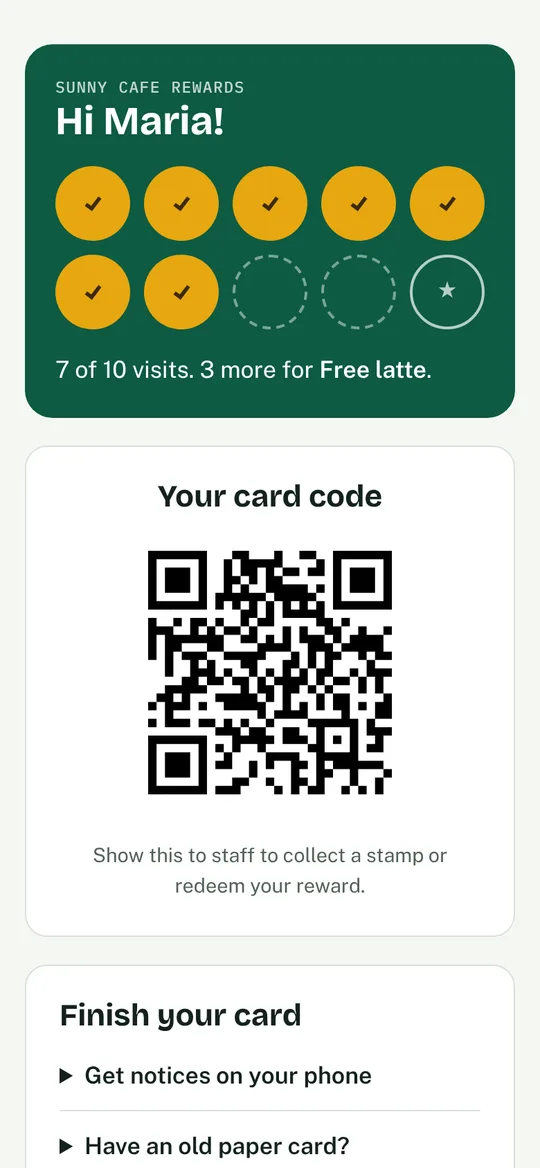
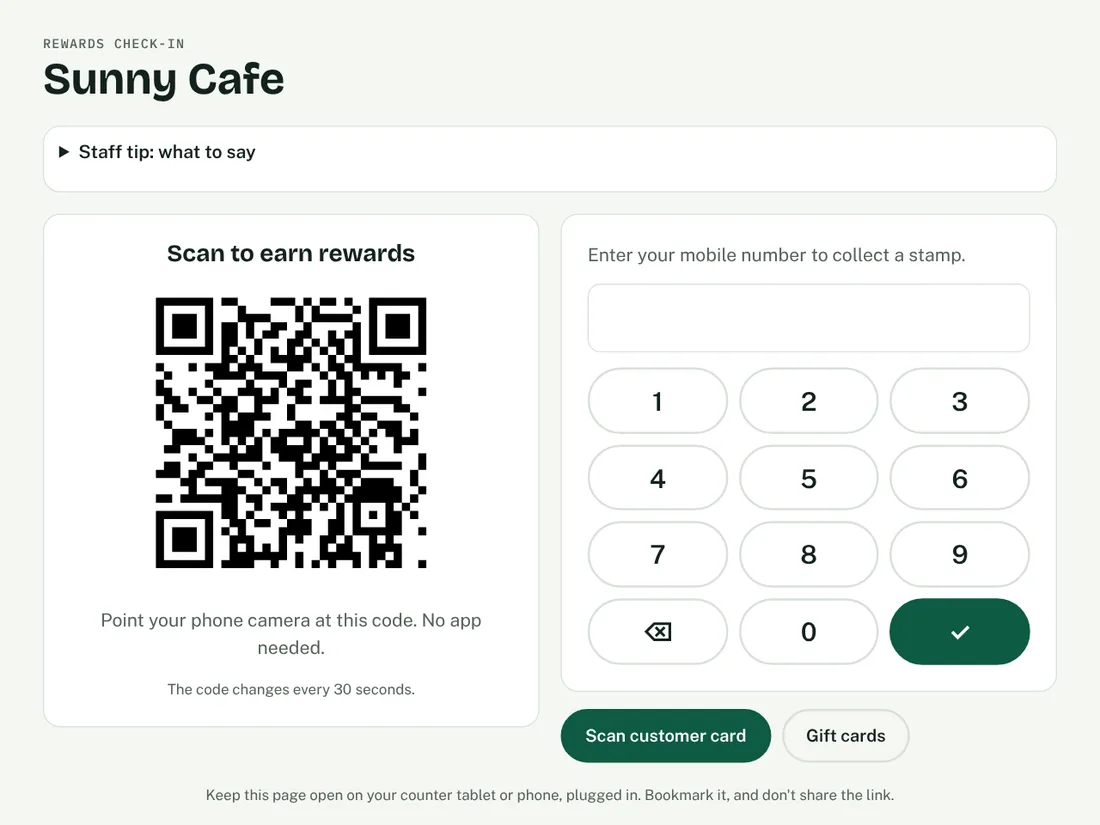
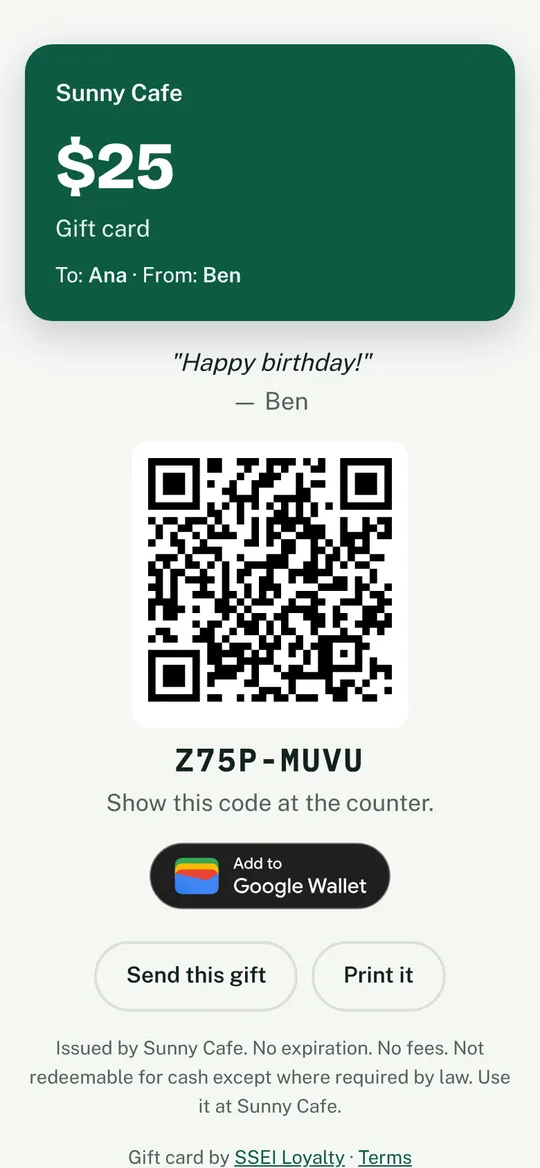
"Sunny Cafe" is a sample shop, not a customer.
WhatsApp 24/7, or email info@sseillc.com. In English or Spanish.More reviews, faster replies, and asking the way Google allows.
- We ask every customer who gave us an email, an hour or two after a visit, with a one-tap link.
- We check your Google listing every day and email you when a new review comes in. When Google shares the review's text, the email includes a reply in your shop's voice. For any other review, paste it into your owner page and get one there, so you can answer every review, including the unhappy ones.
- No rewards, stamps or discounts in exchange for reviews.
- No filtering out unhappy customers before they reach Google.
Ready the day you sign up. No one needs to visit your shop.
Customers can start collecting stamps today. Text messages to customers start once the phone carriers approve your shop's texting, usually within a few days. Everything else you can change yourself from your owner page, any time.
- Right now · 3 minutes
Sign up and pick your reward
Tell us your shop's name and reward, like a free coffee after 10 visits.
- Instantly
Print your sign and start
Download your QR sign and open the check-in screen on any tablet or phone. Customers can join and collect stamps today.
- Your first day · 10 minutes
Follow the checklist
Your owner page walks you through it: add your Google review link, set up the counter screen, and show staff the 1-minute guide. Short how-to videos cover each step.
Built for independent shops, priced like it.
| Contract | None. Cancel any month, with no fees. |
| Price | $49 a month. One plan with every feature included. |
| Your customer list | Yours. Download it any time, and take it with you if you leave. |
| Hardware | None. Runs on a phone or tablet you already have. |
| Register | Works next to any register. Square connects in one click. |
| Customer app | None. Cards live in Apple Wallet and Google Wallet. |
| Gift cards | Included. You keep every dollar. |
| Setup | Free and guided, with how-to videos and 24/7 help by call, text or WhatsApp. Most shops are live the same day. |
One flat price. Cancel any time. Setup included.
SSEI Loyalty
Everything includedOne plan with every feature. No tiers to compare.
- Digital loyalty card, or points per dollar
- Apple Wallet and Google Wallet cards that update themselves
- Counter check-in by QR code, phone number or card scan
- Promotions: double stamp days, welcome bonus, early rewards
- Refer-a-friend rewards
- Google review requests, plus daily review alerts with suggested replies
- Win-back and birthday messages by email and Wallet card, sent automatically
- Owner dashboard, results by location and a monthly results email
- Bring your customers from paper cards or another program
- Guided setup, staff guide, how-to videos and email help
- Gift cards sold at your counter, in Apple Wallet and Google Wallet. You keep every dollar
- Refer another shop and you both get a month free
- Text messages: 500 a month included once your shop's texting number is approved, then 3¢ each
An example to help you decide, not a promise of results.
Start with 30 days free. No card needed. If an extra visit leaves you about $3, 17 a month cover it: less than one a day. Prices are per location, plus applicable sales tax where required. Pay yearly and get 2 months free: $490 per location per year, plus a free printed starter kit (counter sign, window decal and sticker sheet, shipped free). Several locations? Your 2nd–4th locations are 10% off, 5th–9th 15% off, and 10th and up 20% off, with one account, one customer list and stamps that work at every location. Setup is free. Cancel any month with no fees, and take your full customer list with you.
Common questions
Do my customers need to download an app?
No. They join by entering their phone number or scanning the QR code at your counter. Their loyalty card opens right in their phone's browser, and they can add it to Apple Wallet or Google Wallet with one tap, where it updates by itself.
Do I need new hardware?
No. Any tablet or phone you already own works as the check-in screen, and staff can scan customers' cards with its camera.
Which registers do you work with?
Every register, because check-ins happen on a tablet or phone next to it. Using Square? Connect it in one click and customers get their stamp automatically when they pay.
Can I sell gift cards?
Yes, included in your plan. Ring up the sale at your own register as usual, then create the card on your check-in screen with your staff PIN. The customer gets it by scanning a code, by email (now or on a date you pick) or printed, and can add it to Apple Wallet or Google Wallet. Staff scan it or type its code to take amounts off. You keep every dollar: we never hold the money, we just keep track of the balance. No expiration, no fees.
Do you send text messages?
Yes, once you turn texting on. Your shop gets its own texting number, approved by the carriers with your business details (EIN required), which usually takes a few days. 500 texts a month are included; after that you can add credit from $5, at 3¢ per text. Only customers who ticked the texting box get texts, at most 4 a month each, and every text includes a way to stop. Customers with your card in their phone's Wallet get those notices on the card instead, at no cost.
Can I give a reward for leaving a Google review?
No. Google doesn't allow rewards for reviews, and the FTC bans rewards that depend on a review being positive. We help you ask every customer the right way instead, which keeps your program within Google's rules.
Do you help me reply to reviews?
Yes. We check your Google listing every day and email you when a new review comes in. When Google shares the review's text with us, the email includes a reply written in your shop's voice, for happy and unhappy customers alike. Google only shares a few reviews with outside apps, so for any other review, paste it into your owner page and we'll draft a reply there. You post replies on Google yourself. Replying to reviews shows future customers you care, and it's something Google encourages.
I'm switching from another program or paper cards. Do my customers lose their stamps?
No. Bring your customers and their stamps with you. Upload a customer list (CSV) from your old program on your owner page; we match the columns for you and show a preview before anything is saved. For paper punch cards, staff press "Transfer paper card" on the counter screen the first time a customer shows one. We never email or text imported customers.
How much of my time does setup take?
About 15 minutes in all: a 3-minute sign-up, then about 10 minutes on your first day to print your sign and open the check-in screen on a tablet or phone. Short how-to videos on your owner page cover each step, and you can email us any time.
How does billing work?
Your first 30 days are free, with no card needed. When you're ready, add a card on your owner page; you won't be charged before the 30 days are up. Plans are billed monthly per location through Stripe, and adding or removing a location updates your bill automatically.
What happens after I sign up?
Your owner page opens right away. Upload your logo, set your reward, print your counter sign and open the check-in screen on a tablet or phone. Your first customers can join the same day. We email you short tips during your first week, and you can text or WhatsApp us any time.
How is my customers' information handled?
Your customer list belongs to you, and you can download it any time. It's always sent over a secure (HTTPS) connection. Only you, the people you give your owner sign-in to, and SSEI (to run and support the service) can see it. Customers' Wallet cards show only their first name and stamps. We never sell your data or use your customers for anyone else's marketing. Card payments go through Stripe, so we never see card numbers. See our Privacy Policy.
What happens if I cancel?
Your plan ends at the end of that month with no fees. You can download your full customer list before or after you leave.
Go live today.
Sign up, pick your reward, and print your sign. Your first 30 days are free, no card needed, and there's no commitment until you choose a plan.
- Right away: download your QR sign and open your check-in screen.
- Next: follow the short checklist on your owner page; change your reward, customers and settings any time.
- If you want help: watch the how-to videos or email us.
Questions? Call or text (855) 723-0096 or message us on WhatsApp 24/7, in English or Spanish, or email info@sseillc.com